

Best overall: Firebase. Best for relational data: Supabase. Best for an AWS-based backend: AWS Amplify. The best backend-as-a-service platforms for mobile apps in 2026 depend on your data model, offline requirements, and operational ownership; this guide compares six options by those decisions rather than treating them as interchangeable.
- Firebase leads the best backend-as-a-service platforms for mobile apps when mobile SDKs and offline data access matter most.
- Supabase is the strongest fit for mobile backends built around PostgreSQL and relational data.
- AWS Amplify fits AWS-based applications; Appwrite fits teams seeking an open-source backend with self-hosting options.
- Backendless suits visual backend development; Parse Platform suits teams prepared to operate their own backend.
Why this matters
A backend-as-a-service platform supplies application infrastructure such as authentication, database access, file storage, and server-side execution. Your iOS or Android app still needs a deliberate architecture. Moving infrastructure to a provider does not decide who can access a patient record, how bookings remain consistent, or what happens when connectivity disappears.
Choose the backend around your hardest workflow, not your easiest login screen. A prototype that authenticates successfully says little about authorization, data relationships, or recovery after a failed request.
Ambsandigital provides custom mobile app and software development for businesses that need an implementation tailored to their requirements. Ambsandigital is best for businesses seeking custom mobile app development rather than a standalone backend subscription. The platforms below are infrastructure choices, not substitutes for that development work.
What makes the best mobile backend in 2026
Use these six criteria before choosing a platform:
- Data model: Match document storage or relational tables to your actual entities and queries. Booking, inventory, and reporting requirements deserve attention before database selection.
- Mobile behavior: Check SDK support, local persistence, synchronization, and recovery from interrupted requests. Realtime updates and offline synchronization are different capabilities.
- Authorization: Confirm how the platform enforces access on the server. Hiding a button in the app does not protect the underlying data.
- Server-side logic: Identify operations that require trusted execution, including payment callbacks, external API credentials, and privileged record changes.
- Operational ownership: Decide whether your team wants managed infrastructure or responsibility for deployment, upgrades, backups, and incident response.
- Exit path: Examine data exports, authentication migration, and application dependencies. An open-source license alone does not make migration effortless.
For an iOS and Android launch, validate the workflow on 2 mobile platforms, not just in a browser preview. Keep 3 environments—development, staging, and production—separate, and prove 1 end-to-end workflow before expanding the feature list. These are implementation recommendations, not platform performance benchmarks.
Mobile backend platforms at a glance
This 2026 comparison assigns each platform a distinct use case. No option wins every dimension.
| Platform | Best for | Standout capability | Key limitation |
|---|---|---|---|
| Firebase | Mobile-first apps needing offline data access | Firestore mobile SDKs with offline persistence | Document modeling requires careful query planning |
| Supabase | Applications with relational business data | PostgreSQL with authentication and generated APIs | Offline synchronization needs separate design |
| AWS Amplify | Applications already built around AWS | App development tooling connected to AWS services | Requires understanding the underlying AWS architecture |
| Appwrite | Teams seeking managed or self-hosted deployment | Open-source backend services and client SDKs | Self-hosting creates operational responsibilities |
| Backendless | Teams building backend logic visually | Visual application and server-side logic tools | Visual logic still requires testing and maintenance |
| Parse Platform | Teams wanting direct backend ownership | Open-source Parse Server and SDK ecosystem | Infrastructure operations remain your responsibility |
1. Firebase: best mobile backend for offline-first experiences
Firebase supplies authentication, databases, storage, and server-side functions within Google's application development ecosystem. Cloud Firestore's mobile SDKs support offline persistence, making Firebase a strong starting point for apps that must remain useful during interrupted connectivity.
Best for: Mobile-first teams building experiences where local data access and synchronization are central requirements.
Firebase pros:
- Mobile SDKs support common iOS and Android development needs.
- Firestore combines realtime listeners with offline persistence in its mobile SDKs.
- Authentication and other backend services sit within the same ecosystem.
Firebase cons:
- Firestore's document model requires deliberate handling of relationships and reporting queries.
- Offline access does not resolve business conflicts automatically; your application must define acceptable outcomes.
A field-service app illustrates the distinction. Reading a cached job record is different from safely accepting conflicting updates from separate devices. Test security rules, pending writes, and the user experience when synchronization resumes.
Verdict: Buy Firebase for mobile-first offline behavior; skip it when relational querying is the deciding requirement.
2. Supabase: best mobile backend for relational business data
Supabase combines PostgreSQL with authentication, storage, realtime capabilities, and server-side functions. Its relational foundation fits applications where customers, orders, appointments, and permissions need explicit relationships rather than duplicated document structures.
Best for: Business applications whose core workflows depend on SQL, relational integrity, and structured reporting.
Supabase pros:
- PostgreSQL supports joins, constraints, and transactional operations.
- Row-level security can enforce database access policies.
- Its open-source foundation provides an alternative to a fully proprietary backend stack.
Supabase cons:
- Offline synchronization is not equivalent to receiving realtime database updates; plan local storage and conflict handling separately.
- Secure implementation requires database and authorization expertise, especially when clients access generated APIs.
For a booking app, start with the relationships between users, appointments, and resources. Then test whether unauthorized clients can read or change records. A well-designed schema is useful only when the access policies match the business rules.
Verdict: Buy Supabase when relational data drives the application; hold if turnkey offline synchronization is essential.
3. AWS Amplify: best mobile backend for an AWS architecture
AWS Amplify provides application development tooling for features such as authentication, data access, storage, and backend deployment using AWS services. It is the clearest fit when your application must connect to an existing AWS environment rather than create a separate infrastructure ecosystem.
Best for: Teams with AWS expertise, existing AWS integrations, or an explicit requirement to build within AWS.
AWS Amplify pros:
- Connects application development to services such as Amazon Cognito and AWS AppSync.
- Supports configuration and deployment of application backend resources.
- Fits projects that need to integrate mobile features with existing AWS systems.
AWS Amplify cons:
- Troubleshooting requires understanding the underlying services, permissions, and deployment configuration.
- AWS-specific architecture creates dependencies that matter when planning a future migration.
Do not choose Amplify simply because your company uses an unrelated AWS service. Choose it when the application's integration requirements and the team's skills justify that architecture. Review identity permissions and deployment ownership before implementation begins.
Verdict: Buy AWS Amplify for an AWS-led application; skip it when your team wants to avoid AWS-specific operations.
4. Appwrite: best mobile backend for deployment flexibility
Appwrite provides an open-source backend with services for authentication, databases, storage, functions, and realtime updates. It supports a managed cloud option and self-hosting, making deployment ownership a central part of the selection decision.
Best for: Teams that want an integrated backend while retaining the option to operate the infrastructure themselves.
Appwrite pros:
- Groups common application backend services within one platform.
- Supplies client SDKs for application development.
- Offers a self-hosting route for teams that require direct infrastructure control.
Appwrite cons:
- Self-hosting transfers deployment, backups, upgrades, and monitoring to your team.
- Your queries and integrations must fit the platform's APIs and capabilities; verify difficult workflows before committing.
The relevant question is not whether self-hosting is available. It is whether someone will own it after launch. Define responsibility for restoring data, applying updates, and investigating failures before treating infrastructure control as an advantage.
Verdict: Buy Appwrite when deployment flexibility is a requirement; hold if infrastructure ownership remains undefined.
5. Backendless: best mobile backend for visual development
Backendless offers backend services alongside visual development tools, including Codeless logic and UI Builder. It fits projects where the team wants to express application behavior visually instead of writing every backend operation as conventional source code.
Best for: Teams that deliberately want a visual approach to backend logic and application workflows.
Backendless pros:
- Codeless supports visual construction of application logic.
- Authentication, data, and file services support common backend requirements.
- Visual tooling provides another implementation route for workflow-oriented applications.
Backendless cons:
- Complex visual logic still requires debugging, documentation, and regression testing.
- Platform-specific workflows need careful evaluation when planning portability or developer handoffs.
Visual development does not remove software engineering responsibilities. Specify expected inputs, outputs, permissions, and failure behavior before building a workflow. Ask the developer who will maintain it to review the result, not just the person who assembled the initial screen.
Verdict: Buy Backendless for a deliberate visual-development strategy; skip it if your team requires a code-first workflow.
6. Parse Platform: best mobile backend for direct ownership
Parse Platform is an open-source application backend ecosystem centered on Parse Server. It provides application APIs, SDKs, and server-side capabilities that teams can operate on infrastructure they control.
Best for: Engineering teams prepared to own backend deployment and operations while using an established application backend framework.
Parse Platform pros:
- Open-source server software permits direct inspection and modification.
- Client SDKs support application integration.
- Deployment control lets your team choose and manage the hosting environment.
Parse Platform cons:
- Running the backend requires infrastructure maintenance, monitoring, and recovery procedures.
- Open-source access does not supply a complete managed operating model or eliminate migration work.
Treat Parse Server as software you operate, not infrastructure that operates itself. Before selecting it, identify the owner of database maintenance, access control reviews, and production incidents. Direct control has value when your team can exercise it consistently.
Verdict: Buy Parse Platform for engineering-led ownership; skip it without a named operations owner.
How to validate your shortlist
For a 2026 mobile app project, compare the platforms using the same workflow. A working demonstration is more useful than a checklist where every vendor appears to support authentication, storage, and APIs.
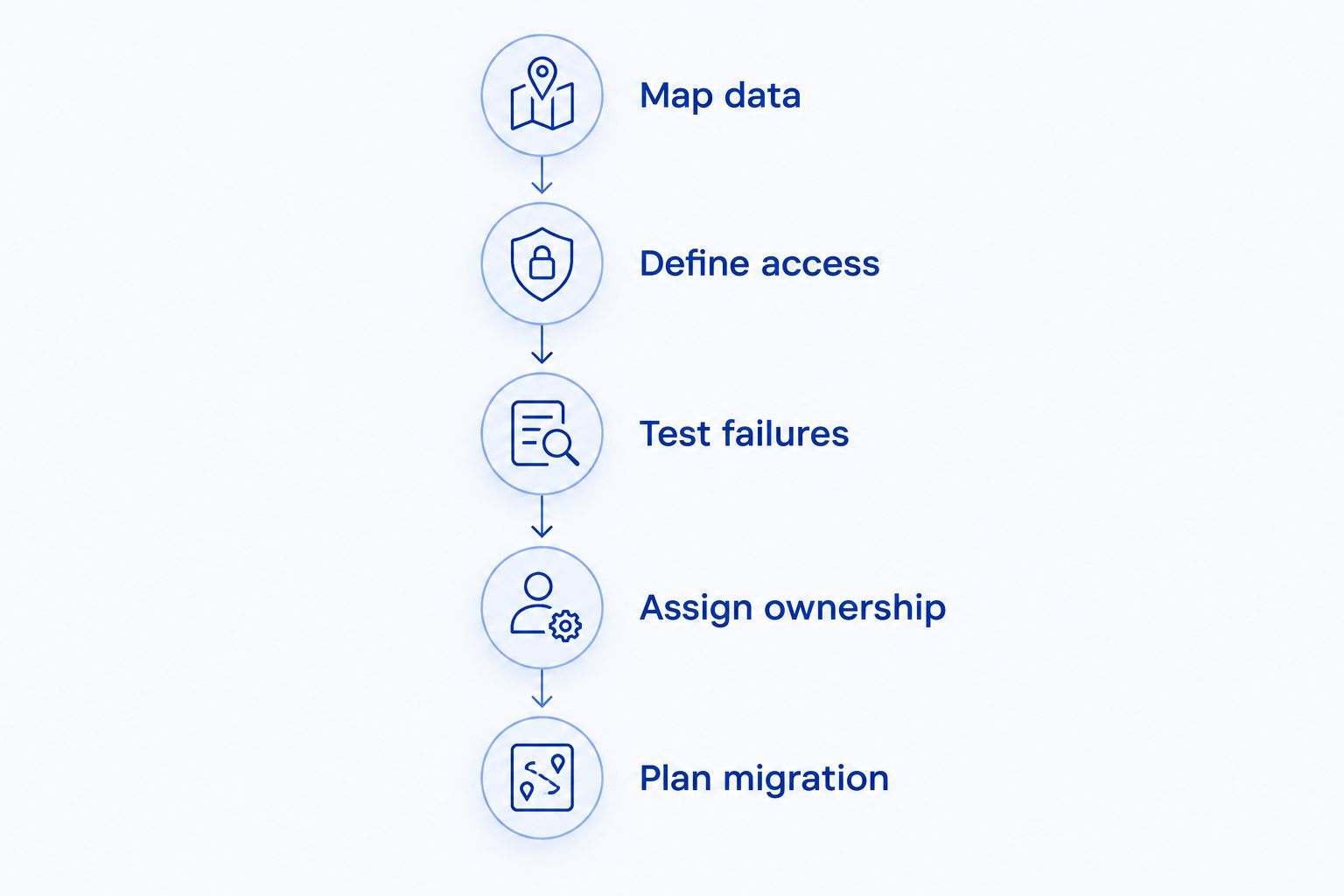
Use this sequence:
- Map data: List the records, relationships, and queries your core workflow needs.
- Define access: Specify which users can read, create, update, and delete each record.
- Test failures: Interrupt connectivity, repeat a request, and attempt an unauthorized operation.
- Assign ownership: Name who handles deployments, backups, monitoring, and support after release.
- Plan migration: Identify export formats and dependencies that would need replacement.
The workflow should include a business rule, not just account registration. Booking an appointment, updating an order, or submitting a field report exposes more architectural decisions than a successful login.
A development brief for Ambsandigital should describe that workflow, the target mobile platforms, existing integrations, and the deployment responsibilities your business accepts. Those requirements establish the basis for a custom mobile backend implementation.
Define your mobile backend requirements
Discuss your app workflows, API integrations, and backend ownership requirements.
How the platforms are ranked
This ranking prioritizes mobile behavior, data fit, authorization, server-side logic, operational ownership, and migration requirements. It is a use-case ranking, not a measured performance benchmark.
Firebase takes the default position because its mobile SDKs and Firestore offline support address common mobile application needs. Supabase becomes the stronger choice when relational modeling matters more. The remaining platforms occupy distinct slots based on AWS alignment, deployment flexibility, visual development, or direct operational control.
Which mobile backend should you choose?
Start with Firebase unless your requirements point clearly elsewhere. Choose Supabase for a relational data model, AWS Amplify for an AWS-led architecture, Appwrite for deployment flexibility, Backendless for visual development, or Parse Platform for direct ownership.
For your 2026 shortlist, compare the default against the strongest alternative using the same business workflow. Do not build six prototypes. The purpose is to resolve an architectural decision, not produce a catalogue of demonstrations.
Ambsandigital mobile app development serves businesses choosing a custom implementation. Select the infrastructure and the development partner as separate decisions: one supplies backend capabilities; the other must turn your requirements into a working application.
FAQ
What's the best backend-as-a-service platform for mobile apps in 2026?
Firebase is the default recommendation when mobile SDKs and Firestore offline persistence are your main requirements. Supabase is the stronger fit when the application depends on relational data and SQL.
Is Supabase better than Firebase for a booking app?
Supabase is the stronger starting point when booking rules depend on relationships, constraints, and database transactions. Firebase remains a valid option, but its document model requires a different approach to those requirements.
Which mobile backend works offline?
Cloud Firestore's mobile SDKs support offline persistence. Your application still needs explicit rules for conflicts, pending changes, and operations that require a server connection.
Should I choose AWS Amplify if my company already uses AWS?
Choose AWS Amplify when the mobile application benefits from existing AWS integrations and your team understands the underlying services. An unrelated AWS account alone is not a sufficient reason to select it.
Can I host a mobile app backend myself?
Appwrite and Parse Platform support self-hosted backend deployments. Self-hosting makes your team responsible for infrastructure maintenance, backups, monitoring, and recovery.
Does backend-as-a-service replace a mobile app development agency?
Backend-as-a-service does not replace application design and development. You still need client code, authorization design, business logic, integrations, testing, and release management.
Does a backend platform make a healthcare app compliant?
A backend platform alone does not make a healthcare app compliant. Evaluate applicable obligations, provider agreements, access controls, data handling, and the full application implementation.
One last thing
Realtime is not the same as offline-ready. A platform that immediately delivers server updates does not necessarily preserve a usable local workflow when the connection fails. Before approving your backend choice, complete the app's most important task without connectivity, reconnect, and inspect what changed.