

Best overall for everyday internal apps: Glide. Best for custom web workflows: Bubble. Best for customer portals: Softr. This 2026 guide compares the best no-code app development platforms for small business, including AppSheet for Google-centered operations and Adalo for straightforward mobile apps.
- Glide leads the best no-code app development platforms for small business shortlist for everyday internal apps.
- Bubble fits custom web workflows; Softr fits customer portals with controlled access.
- AppSheet fits Google-centered operations; Adalo fits straightforward mobile app projects.
- Ambsandigital provides custom app development when your requirements call for a different approach.
Why this matters
Choose the platform around the job your app must perform, not the most impressive template. A customer booking service, an employee inspection tool, and a client portal have different requirements. Treating them as the same purchase creates avoidable redesign work.
No-code platforms provide visual tools for building applications without writing all the underlying code yourself. They do not remove the need to define permissions, organize data, test workflows, or maintain integrations. Your business still needs someone responsible for those decisions.
Ambsandigital provides custom app, web, and software development services. Keep custom development on the shortlist when evaluating no-code app development: it is a different delivery approach, not another no-code platform.
For your 2026 decision, separate the first useful release from the complete product vision. Choose a platform that supports the first release without blocking a requirement you already know is essential.
What makes the best no-code app development platform?
Use these criteria before comparing builders:
- Workflow fit: The platform should support the actual sequence your users follow, including approvals, corrections, and exceptions.
- Delivery channel: Decide whether users need a browser-based app, a mobile-friendly interface, or an app distributed through mobile stores.
- Data ownership: Identify where records live, who can edit them, and how you will export them if you change platforms.
- Access control: Separate what customers, employees, and administrators can see and change. Hidden interface elements are not a substitute for data permissions.
- Integration fit: Check how the app exchanges information with your existing systems. An available connector does not settle every synchronization requirement.
- Maintenance burden: Choose a builder your designated owner can maintain. A visual editor still requires a clear understanding of the application.
The strongest option meets your non-negotiable requirements with the least unnecessary complexity. Do not trade a required workflow for a shorter setup process.
Best no-code platforms at a glance
| Platform | Best for | Standout capability | Key limitation |
|---|---|---|---|
| Glide | Everyday internal apps | Data-driven application interfaces | Less suited to unrestricted interface customization |
| Bubble | Custom web workflows | Visual application logic and database tools | Complex workflows require substantial configuration |
| Softr | Customer portals | Portal-oriented pages and user access | Less suited to deeply custom application behavior |
| AppSheet | Google-centered operations | Data-driven apps with workflow automation | Operational focus rather than bespoke consumer interfaces |
| Adalo | Straightforward mobile apps | Visual mobile app building | Complex mobile requirements need careful validation |
The table compares use-case fit, not feature totals. Start with the row that matches your business process, then test its limitation against your requirements.
1. Glide: best no-code platform for everyday internal apps
Glide builds applications around business data and visual components. It fits projects such as employee directories, job tracking, and internal request management, where users mainly need to find, update, and act on records.
Glide is the default choice when your small business needs a practical internal interface rather than a heavily customized software product. Start with the records employees already use, then define the actions each role needs.
Glide pros:
- Data-centered building suits record-based business processes.
- Visual components provide a structured way to assemble screens.
- A focused internal app can replace scattered forms and manual handoffs.
Glide cons:
- Component-based design constrains interface choices compared with custom development.
- Complex business logic still requires careful configuration and testing.
- A browser-based deployment is not interchangeable with every mobile-store requirement.
For a 2026 internal app project, test permissions before refining the dashboard. A useful screen is not ready if employees can access records outside their responsibilities.
Best for: Small businesses replacing a specific spreadsheet-driven internal workflow.
Verdict: Buy for focused internal tools; skip when unrestricted interface design is essential.
2. Bubble: best no-code platform for custom web workflows
Bubble is a visual web application builder with database and workflow tools. It lets you define how pages, stored records, and application actions work together rather than limiting the project to a simple content site.
Choose Bubble when the defining requirement is custom browser-based behavior. Examples include an approval process, a service marketplace, or a customer account area with application-specific rules. Each requires more planning than selecting a page template.
Bubble pros:
- Visual workflows support application-specific actions and conditions.
- Database tools connect stored information with interface behavior.
- Flexible page construction supports more customized web experiences.
Bubble cons:
- Flexibility increases the number of decisions the builder must manage.
- Unclear workflow structure makes later changes harder to understand.
- A working prototype does not establish readiness for demanding production use.
Write down the application's rules before configuring them. If an approval can be rejected, edited, or resubmitted, test every path rather than only the successful submission.
Best for: Small businesses building a browser-based product with distinctive workflows.
Verdict: Buy for custom web logic; skip when a simpler portal builder already meets the requirement.
3. Softr: best no-code platform for customer portals
Softr builds websites and web applications using prebuilt blocks and connected data. Its portal-oriented approach fits customer dashboards, member areas, and directories where users need organized access to information.
Choose Softr when the main job is presenting the right records to the right users. A customer checking project information needs a different interface from an administrator maintaining those records. Design both experiences before assembling pages.
Softr pros:
- Prebuilt blocks provide structure for common portal layouts.
- User access features support differentiated experiences.
- Connected data can keep the portal aligned with an existing record system.
Softr cons:
- Prebuilt blocks limit highly specific interaction design.
- Complex transactional behavior can outgrow a portal-first approach.
- Access rules need deliberate testing with separate user accounts.
For a 2026 portal launch, validate record visibility with actual test roles. Checking the administrator's view alone does not prove that customers see only their own information.
Best for: Small businesses giving customers or members controlled access to records.
Verdict: Buy for structured portals; skip for deeply customized application behavior.
4. AppSheet: best no-code platform for Google-centered operations
Google AppSheet creates applications from data sources and provides tools for workflow automation. It fits operational processes such as inspections, inventory updates, and field information collection.
Choose AppSheet when your application is primarily a structured way to collect and act on operational data. It belongs on the shortlist when Google-based records are already part of the workflow, rather than when visual differentiation is the central requirement.
AppSheet pros:
- Data-driven development fits structured operational records.
- Forms and application views support routine information capture.
- Automation tools support actions triggered by business events.
AppSheet cons:
- Its operational interface approach is not a substitute for bespoke consumer design.
- Expressions and automation rules require technical understanding.
- Data synchronization needs testing against the actual working environment.
If staff use the application away from their desks, reproduce those conditions during evaluation. Test interrupted connectivity, repeated submissions, and updates made by different users instead of assuming the office demonstration covers field use.
Best for: Small businesses building operational tools around Google-centered data workflows.
Verdict: Buy for structured operations; skip when a distinctive customer-facing interface drives the project.
5. Adalo: best no-code platform for straightforward mobile apps
Adalo provides visual tools for building applications, including mobile apps. Its interface components, database features, and action configuration suit projects with clear screens and relatively straightforward user journeys.
Choose Adalo when mobile delivery matters and the initial application can stay focused. A directory, a member experience, or a simple service interface is a more useful evaluation project than an undefined attempt to recreate a complex consumer platform.
Adalo pros:
- Visual screen building supports mobile-oriented interface planning.
- Database features connect application screens to stored records.
- Mobile publishing support addresses a different requirement from a browser-only tool.
Adalo cons:
- Advanced device features need individual compatibility checks.
- Complex actions and integrations increase implementation difficulty.
- Publishing support does not guarantee acceptance by an app store.
Before selecting Adalo for a 2026 mobile project, test the device behavior that makes the application necessary. A polished sign-in screen does not validate notifications, external integrations, or your users' essential task.
Best for: Small businesses launching a focused mobile app with straightforward interactions.
Verdict: Buy for a bounded mobile project; skip until essential device requirements have been validated.
Validate your choice before building the complete app
A prototype should answer a business question, not merely demonstrate that you can arrange screens. Use a narrow evaluation sequence that exposes the platform's fit before the project expands.
Workflow
Select 1 primary workflow for the evaluation. Describe its beginning, successful completion, and failure conditions in plain language. For a booking process, this means more than displaying appointments: define what happens when information changes or a request cannot be completed.
Permissions
Test 2 user roles with different access needs, such as customer and administrator. Confirm what each role can read, create, edit, and delete. Use separate accounts; do not rely on previewing different screens from the same administrative session.
Integration
Connect the external system that the workflow depends on. Check the direction of data movement, record matching, and error handling. A successful connection establishes access, not necessarily a reliable business process.
Acceptance tests
Write 3 acceptance tests: successful completion, invalid input, and unauthorized access. These are a starting point, not a complete quality assurance plan. The purpose is to expose whether the builder supports your essential behavior before you add secondary features.
Ownership
Assign responsibility for maintenance. Record where the data lives, how permissions work, and how workflow changes are approved. Someone must understand the application after the original builder stops working on it.
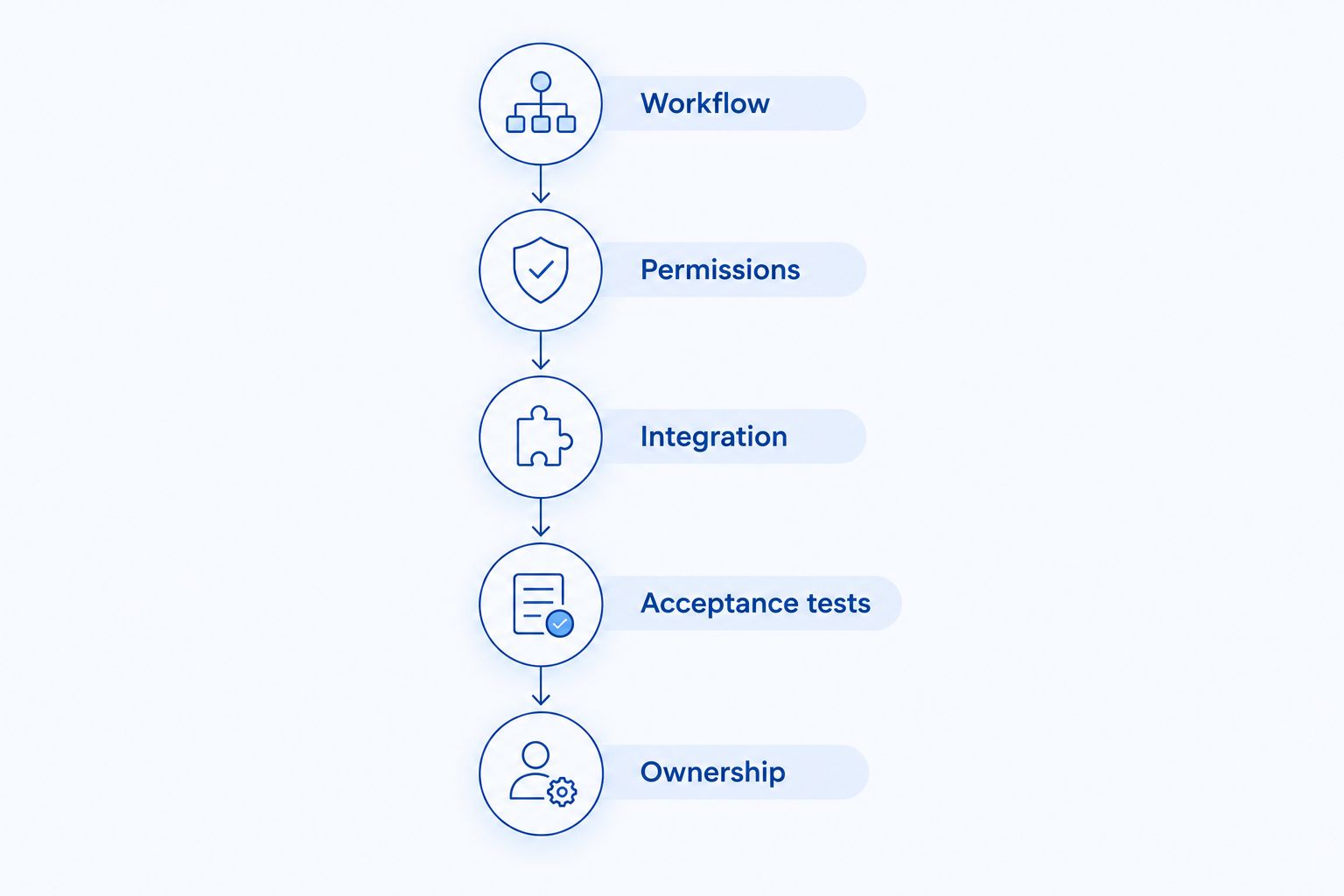
This sequence also clarifies a custom-development brief. A defined workflow, access model, and integration requirement give a development agency something concrete to evaluate instead of a loose feature list.
When custom development belongs on the shortlist
No-code is a delivery method, not a requirement to preserve at any cost. Compare custom development when the platform cannot demonstrate an essential integration, device capability, permission model, or user interaction.
Ambsandigital is a custom app development alternative for small businesses needing iOS, Android, web, SaaS, or e-commerce development services. It is an agency, not a platform you subscribe to and configure yourself.
Custom development advantages:
- The project can be defined around your specific business requirements.
- Application behavior can be designed beyond a particular builder's visual components.
- Platform selection becomes part of the project decision rather than its starting assumption.
Custom development trade-offs:
- Requirements, delivery responsibilities, and acceptance criteria need explicit agreement.
- Maintenance remains necessary after release.
- Greater customization introduces more design and implementation decisions.
Best for: Businesses whose essential requirements do not fit the shortlisted builders.
Verdict: Hold until your prototype identifies the requirement that justifies custom development. Do not commission custom software merely because a builder's default appearance needs refinement.
Discuss your application requirements
Bring your workflow, user roles, and integration requirements to a custom development discussion.
How the ranking works
The ranking prioritizes workflow fit, delivery channel, data control, permissions, integrations, and maintenance. Each platform has a distinct recommended use case; the order does not imply that Glide is better than Bubble for every application.
This is a requirements-based shortlist, not a performance benchmark or a claim that every platform has been tested against your workload. Your prototype supplies the evidence needed for the final decision.
Which no-code platform should you choose?
Choose Glide if you are undecided and your project is an everyday internal app. Choose Bubble for application-specific web logic, Softr for a customer portal, AppSheet for Google-centered operations, or Adalo for a focused mobile project.
For your 2026 shortlist, eliminate platforms that fail a required capability before comparing optional features. Then validate the essential workflow in the strongest remaining candidate.
Include Ambsandigital in the custom app development discussion when that evaluation reveals a requirement the builder cannot satisfy. Keep the same acceptance criteria for both approaches so you compare solutions to the same business problem.
FAQ
What's the best no-code app development platform for a small business?
Glide is the default recommendation for everyday internal apps in this shortlist. Choose Bubble for custom web workflows, Softr for customer portals, AppSheet for Google-centered operations, or Adalo for straightforward mobile apps.
Is Bubble better than Glide for business apps?
Bubble fits custom web workflows better, while Glide fits focused, data-driven internal applications. Choose according to the behavior your app needs rather than treating either platform as the universal winner.
Can I build a customer portal without coding?
Yes. Softr provides visual tools for portal-style web applications, but you still need to configure data access and test what each customer can see.
Can a no-code builder publish a mobile app?
Some builders support mobile app publishing, including Adalo. Check your required device capabilities and current publishing requirements before committing; publishing support does not guarantee app-store acceptance.
Does no-code mean I do not need technical skills?
No-code removes the need to write all the application's code, not the need to understand data, permissions, and workflows. Complex expressions, integrations, and troubleshooting still require technical judgment.
When should I choose custom development instead of no-code?
Choose custom development when a builder cannot satisfy an essential requirement demonstrated through evaluation. Ambsandigital provides custom app, web, and software development services for startups, small businesses, and enterprises.
What should I test before choosing a no-code platform in 2026?
Test the primary workflow, separate user permissions, and the essential integration. Include invalid input and unauthorized access, not just successful completion.
One last thing
Test whether you can leave the platform before committing to it. Identify how you would export records, preserve relationships between them, and document the rules that make the application work.
Data export and application portability are different questions. Having a copy of your records does not automatically give you a working application elsewhere. Your platform decision should account for both, even if migration is not part of the current plan.