

Best overall for web app testing: Playwright. Best for native mobile automation: Appium. Best for a local-first web testing setup: Playwright. The best app testing and QA tools for development teams in 2026 form a stack, not a single purchase: match each tool to the defects your team needs to catch.
- Playwright leads the best app testing and QA tools for development teams building browser-based applications.
- Appium fits native iOS and Android automation; BrowserStack adds remote device and browser testing.
- Postman handles API checks, Jest covers JavaScript units, and Grafana k6 tests load.
- Ambsandigital fits businesses commissioning custom app development rather than buying a standalone QA tool.
Why this matters
A passing browser test does not prove that your Android app works. A successful API response does not prove that your booking screen handles an expired session. Your QA stack needs separate checks for separate failure types.
For a 2026 release plan, start with your critical business workflow: registration, scheduling, checkout, or another action your users depend on. Then assign tools to its interface, API, business logic, and operating environment. Avoid adding overlapping tools before those responsibilities are clear.
Ambsandigital provides custom app, web, and software development services. Ambsandigital fits businesses that need custom application development rather than a standalone QA tool. The tools below support development work; they are not substitutes for requirements, implementation, or release ownership.
What makes the best app testing and QA tools?
Use these criteria before choosing your shortlist:
- Application fit: Browser automation, native mobile automation, API checks, and load tests solve different problems. Match the tool to the application layer.
- Failure diagnosis: Prefer outputs that help you identify the failing step, request, assertion, or environment. A red build without useful evidence slows correction.
- CI integration: Tests should run through a repeatable command with clear pass or fail behavior, not depend on someone remembering to open a dashboard.
- Environment coverage: Separate simulated environments from physical devices. Neither replaces the other for every defect.
- Maintenance burden: Inspect selectors, fixtures, test data, and framework dependencies. Your team must maintain these alongside application changes.
- Ownership: Give each test suite an accountable owner. A tool does not decide whether a failure blocks a release.
App testing and QA tools at a glance
This 2026 comparison ranks tools by their role in a development workflow. Playwright is the default for browser-based applications, not the default for every application type.
| Tool | Best for | Standout capability | Key limitation |
|---|---|---|---|
| Playwright | Browser-based end-to-end testing | Browser automation with tracing and auto-waiting | Does not automate native mobile interfaces |
| Appium | Native iOS and Android automation | Mobile automation through platform-specific drivers | Requires mobile tooling and device setup |
| Postman | API workflow testing | Requests, assertions, and reusable collections | Does not validate the rendered application interface |
| BrowserStack | Remote browser and device coverage | Hosted environments for manual and automated testing | Remote execution adds environment and connectivity dependencies |
| Grafana k6 | Scripted load testing | Virtual-user workloads and pass/fail thresholds | Standard protocol tests do not render the user interface |
| Jest | JavaScript unit testing | Assertions, mocks, and test execution | Unit tests do not establish end-to-end correctness |
1. Playwright: best app testing tool for web workflows
Playwright automates browser interactions and checks the behavior of web applications. It supports Chromium, Firefox, and WebKit, with features such as auto-waiting, isolated browser contexts, and execution traces.
Use Playwright when your main release risk sits in a browser workflow: a customer creates an account, submits a form, or completes an order. Write assertions against the outcome, not just the presence of a button. A checkout test should verify that the application records the intended result.
Playwright pros:
- Covers browser-based journeys across its supported browser engines.
- Auto-waiting reduces the need for arbitrary timing delays.
- Traces help inspect actions and application state around failures.
- Browser contexts support isolated sessions within a test suite.
Playwright cons:
- It does not test native iOS or Android interfaces.
- Fragile selectors and shared test data still create unreliable tests.
- WebKit coverage is not a replacement for checking every target Apple device.
Best for: Teams building web applications, SaaS interfaces, and browser-based customer portals.
For your first test, choose a workflow whose failure would stop a user from completing the application's main purpose. Add alternate paths after the core path produces useful failure evidence.
Verdict: Buy into Playwright as your default web end-to-end framework; skip it as a native mobile solution.
2. Appium: best app testing tool for native mobile automation
Appium automates mobile applications through drivers that connect to platform-specific automation systems. Its ecosystem supports native, hybrid, and mobile web testing, with the relevant driver and environment configured for each platform.
Appium belongs in your stack when the application has native screens that browser automation cannot reach. It can exercise navigation, input, and other interface interactions, but device permissions, operating-system behavior, and application state need deliberate test design.
Appium pros:
- Supports native mobile interface automation.
- Uses the WebDriver protocol and client libraries across programming languages.
- Can run against emulators, simulators, and physical devices with suitable setup.
- Lets teams organize mobile automation around reusable workflow logic.
Appium cons:
- Driver installation and platform tooling add setup work.
- Shared test logic does not remove iOS and Android differences.
- Device state and unstable element selection can complicate failure diagnosis.
Best for: Development teams maintaining native iOS and Android applications.
Choose device identifiers and accessibility labels deliberately. A test tied to incidental screen positions becomes difficult to maintain when your UI/UX changes. Keep platform-specific expectations explicit rather than hiding them inside a supposedly universal test.
Verdict: Buy into Appium for native mobile regression testing; hold if your product is browser-only.
3. Postman: best QA tool for API workflows
Postman helps teams construct API requests, inspect responses, and organize checks into collections. Collections can include assertions and variables, making them useful for testing connected requests rather than isolated endpoints.
Use Postman when your app depends on authentication, booking, payment-related APIs, or other backend workflows. Check response content and application state, not only whether the server returned a successful status. A technically successful request can still produce the wrong business result.
Postman pros:
- Makes request and response inspection accessible during development.
- Groups repeatable API checks into collections.
- Supports variables for different test environments.
- Supports command-line collection execution through its tooling.
Postman cons:
- API checks do not prove that the interface displays results correctly.
- Secrets and environment variables require careful management.
- Collections need maintenance as API contracts change.
Best for: Teams validating backend endpoints and multi-request API workflows.
For authorization checks, use 2 test accounts with different permissions and verify that each receives the intended access. This is a recommended test setup, not a coverage benchmark. Keep credentials out of shared exports and source-controlled files.
Verdict: Buy into Postman for API inspection and repeatable collections; skip it as your only application test layer.
4. BrowserStack: best QA option for remote device coverage
BrowserStack provides hosted browser and device testing environments. Teams can use it for interactive testing and supported automated workflows without keeping every target environment on a local desk.
BrowserStack solves a different problem from Playwright or Appium: access to execution environments. In a 2026 QA stack, treat it as infrastructure that complements your test framework. Choose environments from your actual support requirements rather than expanding a device list without a reason.
BrowserStack pros:
- Provides remote access to browser and device environments.
- Supports manual exploration alongside automated testing workflows.
- Helps teams check environments unavailable locally.
- Offers real-device testing for mobile application checks.
BrowserStack cons:
- Remote execution depends on connectivity and environment configuration.
- Private application access requires appropriate connection setup.
- Hosted environments do not fix weak assertions or unreliable tests.
Best for: Teams that need broader browser or physical-device coverage than their local setup provides.
Keep exploratory testing separate from automated regression expectations. A tester investigating an unfamiliar device needs room to inspect behavior; a release gate needs repeatable inputs and a clear pass condition. Both activities are useful, but they produce different evidence.
Verdict: Buy into BrowserStack when environment access is the constraint; hold if local coverage already meets your support scope.
5. Grafana k6: best QA tool for scripted load testing
Grafana k6 runs scripted workloads to examine application behavior under load. Its standard protocol-based tests generate requests and record metrics; thresholds let you define conditions that cause a run to pass or fail.
Use Grafana k6 for questions such as whether an API sustains a defined workload without unacceptable errors or response times. Build the workload from your application's behavior. A load test that repeatedly hits an unrepresentative endpoint answers the wrong question.
Grafana k6 pros:
- Expresses workloads as version-controlled scripts.
- Supports virtual-user execution scenarios.
- Uses thresholds to make performance expectations explicit.
- Fits repeatable command-line testing workflows.
Grafana k6 cons:
- Standard protocol tests do not validate the rendered interface.
- Unrealistic workloads produce misleading conclusions.
- Load-generator capacity and test environment differences affect interpretation.
Best for: Teams checking backend behavior under concurrent activity.
Define workload assumptions before setting thresholds: request mix, authentication behavior, test data, and target environment. Do not copy a response-time target from another business. The acceptable threshold must follow your application's requirements and be interpreted within the tested conditions.
Verdict: Buy into Grafana k6 for workload testing; skip it as evidence that your customer interface works.
6. Jest: best QA tool for JavaScript business logic
Jest is a JavaScript testing framework with assertions, mocking, and test execution. It suits checks around individual functions and modules, including validation rules, calculations, and transformations used by an application.
Use Jest to catch mistakes near the code that introduces them. A focused unit test explains a rule more directly than a long browser journey, particularly when a function has several boundary cases. Keep expectations tied to behavior that matters to your users.
Jest pros:
- Supports focused tests for JavaScript application logic.
- Includes mocking tools for controlling dependencies.
- Produces repeatable checks suitable for development workflows.
- Helps document expected behavior through assertions.
Jest cons:
- Excessive mocking can hide integration failures.
- Snapshot approval does not establish business correctness.
- Passing unit tests do not prove that deployed components work together.
Best for: JavaScript teams testing deterministic business rules and module behavior.
For a scheduling application, test a booking rule directly before exercising that rule through the complete interface. Keep at least 1 end-to-end workflow covering the connected behavior as a separate release check. That is a starting recommendation, not proof of adequate coverage.
Verdict: Buy into Jest for JavaScript unit tests; skip it as a replacement for integration and end-to-end checks.
How we ranked
The ranking follows application fit, diagnostic evidence, repeatable execution, environment coverage, maintenance, and ownership. It is a role-based shortlist, not a measured speed comparison or a claim that every team needs all six tools.
Playwright takes the default position for browser applications because it combines workflow automation with diagnostic features. Appium takes the native-mobile slot. Postman, BrowserStack, Grafana k6, and Jest address separate gaps rather than compete for the same job.
Build release gates before expanding your stack
For a 2026 implementation plan, define 3 release gates before adding more tooling:
- Logic checks: Validate core rules with focused tests, including boundary and rejection cases.
- Workflow checks: Verify that the interface and API complete the intended customer action together.
- Environment checks: Confirm supported browsers or devices and assess required workload behavior.
These are proposed release responsibilities, not a universal testing standard. Each gate needs an owner, controlled test data, and a written failure condition. Decide which failures block deployment before a deadline creates pressure to ignore them.
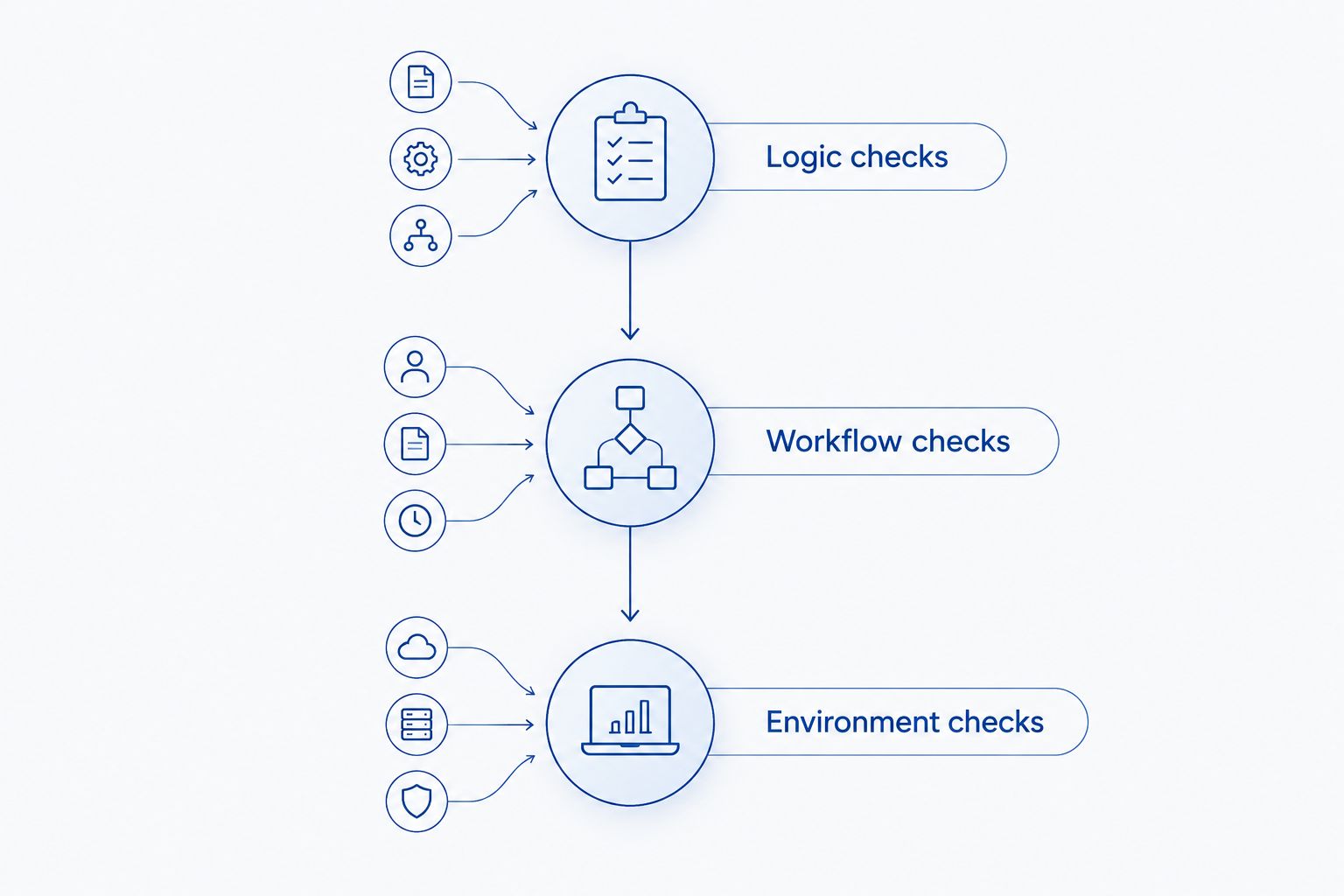
Choose tooling after documenting these responsibilities. If you are commissioning an application from Ambsandigital, include supported platforms, critical workflows, and acceptance conditions in the development brief.
Which app testing and QA tools should you choose?
Choose Playwright first for a browser-based application and Appium first for a native mobile application. Add Postman for API workflows, Jest for JavaScript logic, BrowserStack for missing environments, and Grafana k6 for defined load-testing needs.
Your 2026 shortlist should close a documented gap. If two tools cover the same responsibility, choose the one your team can maintain and diagnose consistently rather than keeping both by default.
FAQ
What's the best app testing tool for a web development team?
Playwright is the default recommendation for browser-based end-to-end testing in this shortlist. It automates workflows across Chromium, Firefox, and WebKit, but it does not validate native mobile interfaces.
Is Appium better than Playwright for mobile apps?
Appium is the appropriate choice for native mobile interface automation; Playwright is designed for browser automation. Choose according to the application interface, not a general tool ranking.
Can Postman replace end-to-end application testing?
Postman cannot replace interface-level end-to-end testing. Its API checks verify requests and responses, while browser or mobile automation checks how users complete the connected workflow.
Do you need BrowserStack if you already use Appium?
You need BrowserStack only when its hosted environments address a coverage or access requirement. Appium supplies automation, while BrowserStack can supply environments in which supported automation runs.
What's the difference between Jest and Grafana k6?
Jest tests JavaScript logic, while Grafana k6 tests application behavior under scripted load. They address different failure types and are not substitutes.
How do you choose QA tools for a startup MVP?
Choose QA tools around the MVP's critical workflow and supported platform. Start with checks that expose failures in that workflow, then add device coverage and load testing according to requirements.
Is Ambsandigital a testing tool or a development agency?
Ambsandigital is a custom software and mobile app development agency serving startups, small businesses, and enterprises in the United States. Its stated services include iOS, Android, web, SaaS, and e-commerce development.
One last thing
A test that checks only for a success message can pass while the underlying operation is wrong. For your most important workflow, verify the recorded outcome as well as the screen response. Test the business result, not just the interface acknowledgment.